Online 3D model converter for GLB, USDZ, OBJ, STL, and more
Convert 3D files directly in your browser, edit materials, and export for web, AR, and 3D printing. Client-side processing keeps models private while delivering fast GLB, GLTF, USDZ, OBJ, STL, PLY, and 3MF outputs.
- 🔁 Convert GLB, GLTF, USDZ, OBJ, STL, PLY, 3MF
- 🎨 Edit materials and textures before export
- 🖨️ Generate print-ready STL/PLY for slicing
- 📱 Export USDZ for iOS AR Quick Look
Convert once, publish everywhere
Move assets between CAD, web, AR, and 3D printing pipelines without rewriting your workflow. Optimize GLB for fast loading, export USDZ for Apple AR, or generate STL/PLY for print prep — all client-side.
Advanced Converter Features
Multi-Format Export
Convert and export to GLB, GLTF (with separate BIN), OBJ (with MTL materials), STL (ASCII or binary), PLY (with vertex colors), and USDZ for Apple AR. Full support for embedded textures in GLB or separate texture files for other formats. Handles multiple meshes, materials, and complex hierarchical structures. Choose export options like texture resolution, compression quality, and coordinate system orientation for maximum compatibility.
100% Client-Side Processing
All 3D model conversions happen entirely in your web browser using WebGL and WebAssembly technologies. Your proprietary CAD models, product designs, and confidential prototypes never leave your device — they're not uploaded to our servers, not stored in any cloud database, and not transmitted over networks. Perfect for converting sensitive intellectual property, unreleased game assets, or confidential manufacturing designs with complete privacy and security guaranteed.
3D Printing Ready
Generate print-ready STL files optimized for FDM (Fused Deposition Modeling) and SLA (Stereolithography) printers. Export PLY format with full vertex color support for multi-color printing. Choose between ASCII or binary STL formats for compatibility with all major slicing software including Cura, PrusaSlicer, Simplify3D, and Chitubox. Automatic mesh validation ensures watertight geometry suitable for successful prints without errors.
Material & Texture Editor
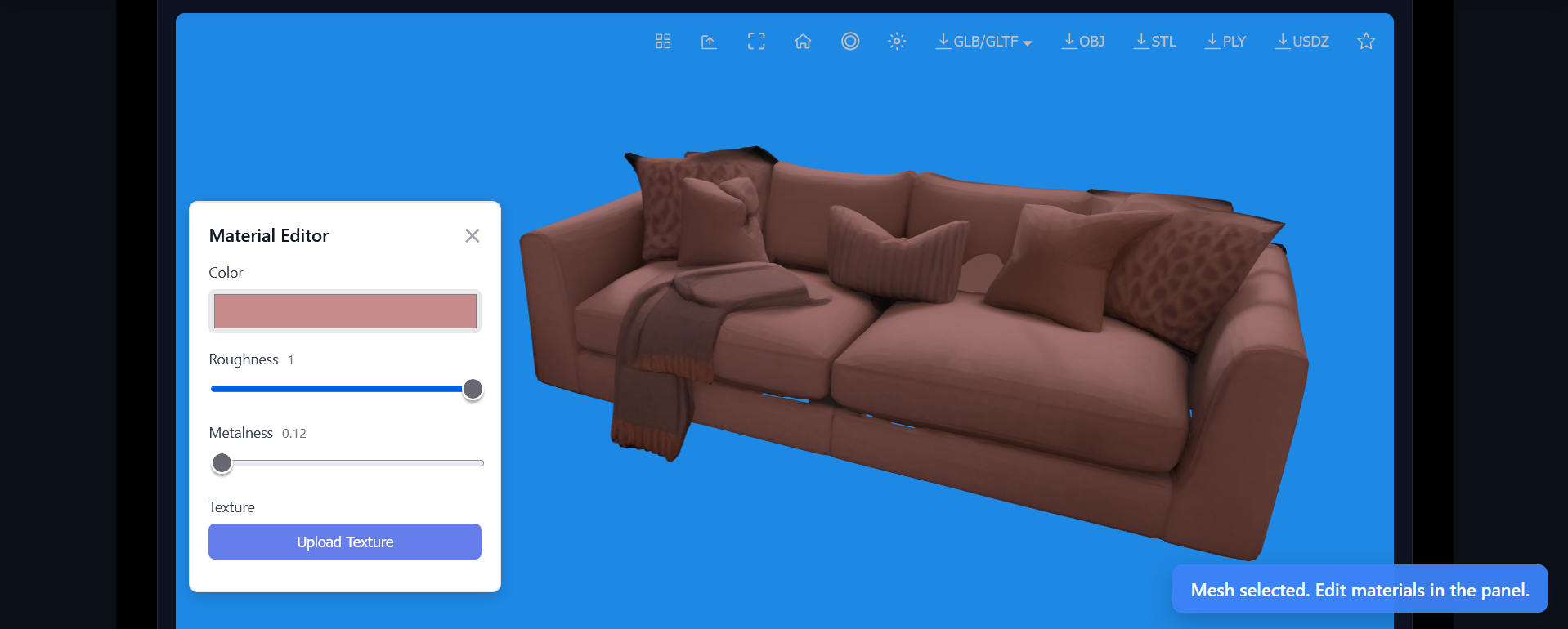
Click any mesh in your model to select and edit its material properties in real-time. Adjust base color with intuitive color pickers, control roughness from glossy to matte, and set metalness for realistic metal surfaces. Upload custom texture images (JPG, PNG, TGA) to replace or add diffuse maps. All material edits use physically-based rendering (PBR) powered by Three.js for accurate, photorealistic previews before export.
Apple AR (USDZ) Export
Export optimized USDZ files specifically designed for iOS AR Quick Look functionality. View your converted models in augmented reality on iPhone and iPad with a single tap — no app installation required. Perfect for e-commerce "try before you buy" experiences, furniture placement visualization, product demos, and educational AR content. USDZ files maintain materials, textures, and scale information for realistic AR presentation in real-world environments.
Web-Optimized GLB
Create lightweight, performance-optimized GLB files perfect for websites, e-commerce product pages, online portfolios, and WebGL applications like Three.js or Babylon.js. Automatic texture compression using basis universal format reduces file sizes by up to 80% while maintaining visual quality. Mesh optimization removes duplicate vertices and unused data. Configure compression levels from maximum quality for hero assets to maximum compression for mobile-first sites with slower connections.
Perfect for Every Workflow
🏭 Product Design & Engineering
Convert CAD models to web-ready formats for client presentations. Export STL files for rapid prototyping and 3D printing validation. Edit materials to match production specifications.
🎮 Game Development
Prepare 3D assets for game engines. Convert between formats for Unity, Unreal, or web-based games. Optimize mesh topology and texture maps for real-time rendering.
🛒 E-Commerce & Marketing
Create interactive 3D product viewers for your online store. Export USDZ for AR try-before-you-buy experiences. Generate thumbnail renders and 360° previews.
🏠 Architecture & Visualization
Convert architectural models for web portfolios. Export to formats compatible with rendering software. Share interactive walkthroughs with clients.
🎓 Education & Research
Prepare 3D models for academic presentations and publications. Convert scientific visualizations to accessible web formats. Create AR learning experiences for students.
🎨 3D Art & Animation
Convert sculpts from ZBrush, Blender, or Maya for online portfolios. Export models for 3D printing your artwork. Create web galleries showcasing your creative work.
Supported 3D File Formats
GLB/GLTF
Industry-standard format for web, AR, and VR. Supports animations, materials, and textures. Best for: Web embedding, AR experiences, game engines.
USDZ
Apple's AR format for iOS devices. Optimized for AR Quick Look on iPhone/iPad. Best for: Mobile AR, e-commerce AR, retail experiences.
OBJ
Widely compatible format supported by most 3D software. Can include MTL files for materials. Best for: CAD software, 3D modeling apps, cross-platform compatibility.
STL
Standard format for 3D printing. Describes surface geometry as triangulated mesh. Best for: FDM/SLA printing, CNC machining, prototyping.
PLY
Polygon file format supporting vertex colors and properties. Great for scanned data. Best for: 3D scanning, point clouds, photogrammetry, color 3D printing.
FBX, 3MF
Import FBX from game engines and 3MF for multi-material 3D printing. Convert to web-compatible formats.
How the 3D Converter Works
- Upload Your Model: Drag and drop any supported 3D file (GLB, OBJ, STL, FBX, PLY, 3MF, GLTF) into the converter. Files up to 200MB supported.
- Edit Materials (Optional): Click any part of your model to select it. Adjust colors, roughness, metalness, and upload custom textures using the material editor.
- Choose Export Format: Select your desired output format: GLB for web, USDZ for iOS AR, STL for 3D printing, or OBJ for universal compatibility.
- Download Instantly: Click export and your converted file downloads immediately. All processing happens in your browser — no waiting, no uploads.
Why Choose Our 3D Model Converter?
Our browser-based 3D converter is the fastest, most secure way to convert 3D models between formats. Built with WebGL and Three.js, it processes files entirely in your browser — no uploads, no cloud processing, no privacy concerns. Whether you're a professional designer, engineer, game developer, or hobbyist, our converter handles complex models with materials, textures, and multiple meshes.
The material editor lets you customize every aspect of your 3D model before export. Select individual meshes, adjust PBR material properties (color, roughness, metalness), and upload custom textures. See changes in real-time with our high-fidelity WebGL renderer. Export models with your customizations baked in — perfect for product visualization, e-commerce, and branded 3D content.
For 3D printing enthusiasts, generate clean STL files optimized for slicing software. Our STL exporter maintains mesh integrity and supports both ASCII and binary formats. Export PLY files with vertex colors for full-color 3D printing on compatible printers. Validate mesh quality with our built-in viewer and run a 3D model inspection before sending to your printer.
E-commerce and marketing teams can create AR-ready USDZ files for iOS devices in seconds. Enable "try before you buy" experiences by letting customers view products in their space using AR Quick Look. Use the interactive 3D viewer to embed the same assets on product pages while our USDZ exporter preserves materials for realistic AR rendering on iPhone and iPad.
Web developers and designers can convert models to lightweight GLB format for fast loading websites. Our GLB export includes texture compression and mesh optimization, reducing file sizes by up to 80% while maintaining visual quality. Embed interactive 3D models in product pages, portfolios, documentation, and landing pages.
Free for Everyone, No Account Required
Use the converter for free with no registration. Process unlimited files during your session. Create a free account to save your work, access premium features like batch conversion, and increase file size limits up to 200MB.
Professional Features
Advanced users appreciate our technical capabilities: Support for external texture files (JPG, PNG, TGA), MTL material libraries for OBJ files, binary BIN files for GLTF, and texture maps for FBX and 3MF formats. The converter automatically maps textures and materials during conversion, preserving your model's appearance across formats.
Security and Privacy
Your 3D models are valuable intellectual property. Our client-side architecture means your files never leave your device — they're not uploaded to our servers or stored in the cloud. Convert proprietary CAD models, product designs, and confidential prototypes with complete confidence. All processing happens in your browser using WebAssembly and WebGL for maximum performance and security.