Online 3D model viewer for GLB, USDZ, OBJ, STL, and more
Preview, inspect, and share 3D models in seconds. The browser-based viewer supports WebXR VR, realistic lighting, and material edits so you can deliver polished, interactive links and embeds without desktop software.
- 🥽 WebXR VR mode for Meta Quest, HTC Vive, and more
- 🌄 Branded backgrounds, lighting presets, and camera saves
- 📦 GLB, GLTF, USDZ, OBJ, STL, FBX, PLY, 3MF support
- 🔗 Share links and embed responsive 3D viewers anywhere
Works with every production format
Upload GLB/GLTF for web, USDZ for iOS AR, OBJ for legacy pipelines, STL/PLY for 3D printing, or FBX and 3MF for complex assets. The viewer preserves textures, materials, and lighting so stakeholders see the true final look.
Professional 3D Viewer Features
Virtual Reality Viewing
Experience immersive VR mode powered by WebXR API. View your 3D models in virtual reality using Meta Quest, HTC Vive, Valve Index, or Windows Mixed Reality headsets. Perfect for architectural walkthroughs, product design reviews, and educational content. Hand tracking support enables natural interaction with your models in VR space.
Intuitive 3D Controls
Smooth orbit, pan, and zoom controls work seamlessly on desktop, tablet, and mobile devices. Auto-spin mode keeps models rotating for presentations and product showcases. Keyboard shortcuts accelerate workflows for power users. One-click home view reset and fullscreen mode for immersive viewing. Touch gestures support pinch-to-zoom and two-finger rotation on mobile devices.
Custom Backgrounds
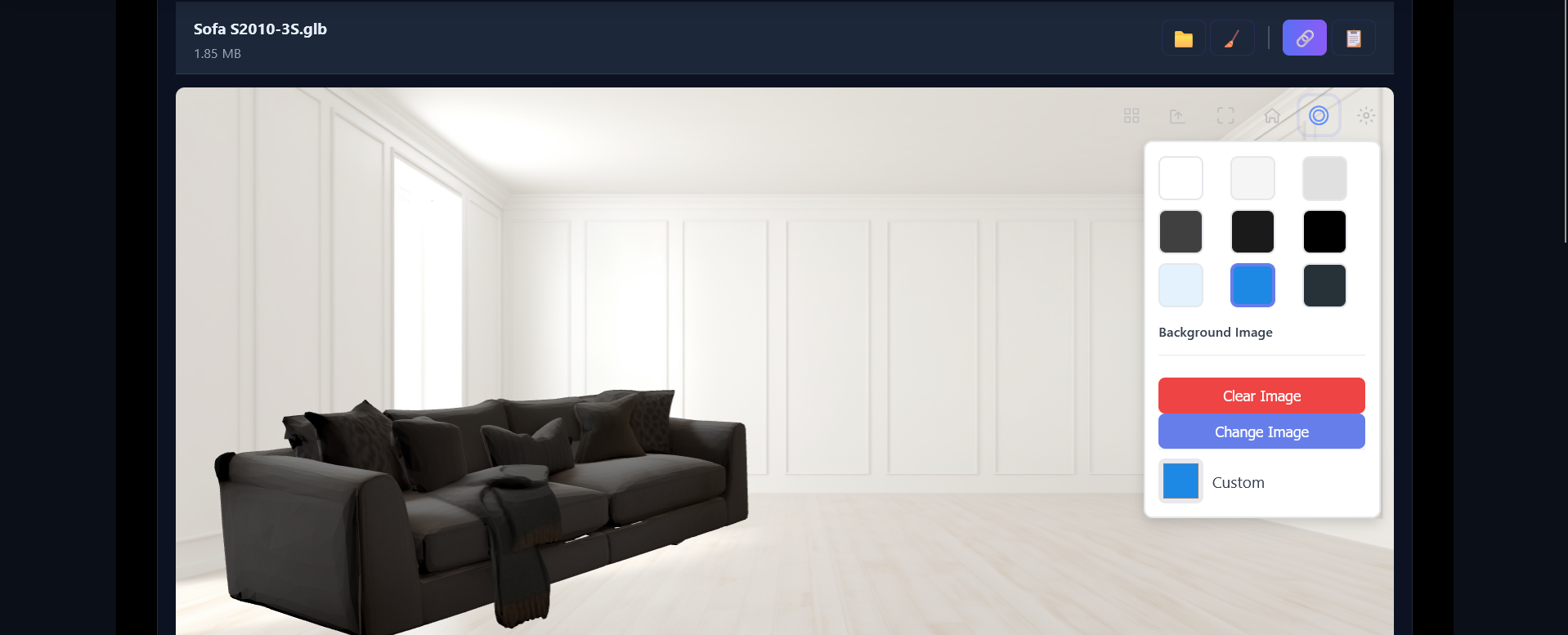
Upload your own background images to match your brand aesthetic or product photography. Choose from preset solid colors for clean presentations. Environment textures provide realistic lighting and reflections on metallic and glass materials. Custom backgrounds are automatically saved with shared links and embedded viewers, ensuring consistent branding across all platforms.
Material & Lighting Editor
Choose from three professionally calibrated lighting presets: Studio lighting for balanced presentations, Bright lighting for technical details and engineering reviews, or Soft lighting for artistic renders. Adjust model materials in real-time with color pickers, roughness sliders, and metalness controls. Powered by Three.js with physically-based rendering (PBR) for photorealistic material representation that matches industry standards.
Share & Embed Anywhere
Generate secure share links in seconds with custom titles, descriptions, and expiration dates from 1 day to never expire. Password protection available for confidential designs. Embed interactive 3D models in WordPress blogs, Shopify product pages, technical documentation, and portfolio websites. Responsive iframe embeds automatically adapt to container width while maintaining aspect ratio and full interactivity.
Universal Format Support
Load and display GLB, GLTF, USDZ, OBJ, STL, FBX, PLY, and 3MF files with full fidelity. Automatic texture mapping handles MTL material files, BIN binary data, and all common image formats including JPG, PNG, TGA, and HDR. Supports complex multi-mesh models with hierarchical structures, bones, and animations. Drag-and-drop file loading works with zip archives containing multiple assets.
High-Quality Rendering
WebGL-powered renderer delivers stunning visuals with multi-sample anti-aliasing (MSAA) and real-time shadow mapping. Capture 4K resolution screenshots perfect for marketing materials and client presentations. Color-accurate sRGB workflow ensures what you see matches production output, critical for product photography validation, packaging design approval, and manufacturing color matching across different displays and print media.
Optimized Performance
Fast initial loading with progressive mesh streaming shows low-resolution preview instantly while full details load in background. Automatic Level of Detail (LOD) generation handles large models by reducing polygon count for distant objects. GPU-accelerated rendering maintains smooth 60fps interaction even with complex scenes. Frustum culling and occlusion optimization reduce draw calls for better performance on mobile devices and older hardware.
Virtual Reality 3D Viewing
Experience your 3D models in immersive virtual reality. Our WebXR-powered VR viewer supports all major VR headsets including Meta Quest 2/3/Pro, HTC Vive, Valve Index, and Windows Mixed Reality devices.
🎮 One-Click VR Mode
Simply click the VR button in the toolbar to enter immersive mode. The viewer automatically detects your VR headset and optimizes rendering for stereo vision.
🔍 Natural 6DOF Movement
Move around your 3D models naturally with full six degrees of freedom. Walk closer to inspect details or step back to see the full design in virtual space.
🎯 Perfect for Design Reviews
Architectural walkthroughs, product design reviews, and engineering validation become more effective in VR. Share VR-enabled links with clients and stakeholders.
Perfect for Every Industry
🛒 E-Commerce & Retail
Boost conversions with interactive 3D product viewers. Let customers explore products from every angle before purchasing. Export USDZ for AR try-before-you-buy on iOS devices. Reduce returns by showing accurate product details.
🏭 Manufacturing & CAD
Share CAD models with suppliers and clients without sending files. Review 3D designs in VR for better spatial understanding. Embed viewers in RFQ documents and technical specs. Validate designs before production.
🎮 Game Development
Preview game assets and character models in real-time. Share work-in-progress with team members and clients. Test materials and lighting before importing to game engines. Create interactive portfolios showcasing your 3D work.
🏠 Architecture & Real Estate
Present building designs and interior spaces interactively. Let clients explore floor plans and architectural details in VR. Embed 3D models in property listings and marketing materials. Win more projects with engaging presentations.
🎓 Education & Training
Create interactive learning materials with 3D models. Teach anatomy, engineering, or history with spatial visualization. Students can view models on any device without specialized software. VR mode for immersive educational experiences.
🎨 Art & Design Portfolios
Showcase 3D artwork, sculptures, and digital designs in stunning detail. Embed models in portfolio websites and Behance projects. Share work with art directors and potential clients. VR galleries for virtual exhibitions.
Technical Capabilities
- Supported Formats: GLB, GLTF (with BIN), USDZ, OBJ (with MTL), STL (ASCII & Binary), FBX, PLY, 3MF
- Textures: Automatic loading of JPG, PNG, TGA, WebP, GIF, and BMP texture files
- Materials: PBR materials with baseColor, metallic, roughness, normal, and occlusion maps
- File Size Limits: Up to 50MB (Free), 100MB (Basic), 200MB (Pro)
- Rendering: WebGL 2.0 with Three.js r160+, sRGB color space, tone mapping, anti-aliasing
- VR Support: WebXR API, all major VR headsets, hand tracking ready
- Performance: 60fps target, automatic LOD, GPU instancing for complex scenes
- Compatibility: Chrome, Firefox, Safari, Edge (desktop & mobile)
Why Choose Our 3D Model Viewer?
Our professional 3D viewer is the most advanced browser-based solution for viewing and sharing 3D models. Built on WebGL and Three.js, it delivers desktop-quality rendering performance directly in your browser — no plugins, no downloads, no installations required. Whether you're showcasing products for e-commerce, presenting architectural designs to clients, or sharing game assets with your team, our viewer handles complex models with ease.
The VR viewing feature sets us apart from basic 3D viewers. With one click, transform any 3D model into an immersive virtual reality experience. VR mode is perfect for architectural walkthroughs where clients can "walk" through spaces at real scale, product design reviews where engineers can inspect parts from all angles, and educational content where students can explore 3D models in an engaging, memorable way. Our WebXR implementation works with all major VR headsets including Meta Quest, HTC Vive, Valve Index, and Windows Mixed Reality devices.
Customization options help your 3D models look their best. Upload custom background images to match your brand or product photos. Choose from three lighting presets optimized for different model types: Studio lighting for balanced presentation, Bright lighting for technical details, or Soft lighting for artistic renders. Adjust camera field of view, auto-spin speed, and initial viewing angles. Save all settings with share links so viewers see exactly what you intend.
For e-commerce businesses, interactive 3D product viewers dramatically improve customer engagement and reduce return rates. Studies show customers who interact with 3D product models are 95% more likely to make a purchase. Our viewer loads fast, works on all devices, and provides smooth 360° rotation that lets customers inspect products from every angle. Export to USDZ for iOS AR Quick Look, enabling "try before you buy" experiences where customers place virtual products in their real space.
Technical teams appreciate the format flexibility. Upload OBJ files with MTL materials and separate texture files — the viewer automatically maps everything correctly. GLTF models with external BIN files and textures work seamlessly. FBX files from game engines load with animations and materials preserved. Even legacy STL and PLY files display perfectly with automatic material assignment.
Sharing is simple yet powerful. Generate a shareable link with one click. Set custom expiry dates from 1 day to never expire. Add password protection for confidential designs. Choose whether viewers can download the original file or only view it. Track how many people viewed your model and when (Pro feature). Share links work perfectly in emails, Slack messages, project management tools, and social media.
Embedding 3D viewers in websites is effortless. Copy the iframe code and paste it into any HTML page. Embeds are fully responsive, automatically adjusting to container size. Customize which controls are visible — hide export buttons for public embeds, show full controls for internal documentation. Set auto-spin mode for homepage hero sections. The viewer works in WordPress, Shopify, Webflow, React, Vue, Angular, and plain HTML.
Enterprise-Grade Performance & Security
Models are served from a global CDN with 99.9% uptime. Large files load progressively so users see the model immediately while high-resolution details stream in. All connections use HTTPS encryption. Private models are never indexed by search engines. Delete shared links anytime to revoke access instantly. Enterprise plans include custom domains, white-label branding, SSO integration, and dedicated support.
Free Forever Plan
Start viewing and sharing 3D models for free. No credit card required. Free plan includes unlimited model uploads (up to 50MB), 10 active share links, all viewer features including VR mode, and basic export formats. Upgrade to Basic or Pro for larger file sizes, unlimited shares, advanced analytics, and premium features.