Give every mesh a quick health check
Upload a GLB, STL, OBJ, or USDZ and walk away with clear stats, error overlays, and a performance score you can share with the team. Everything runs locally in your browser.
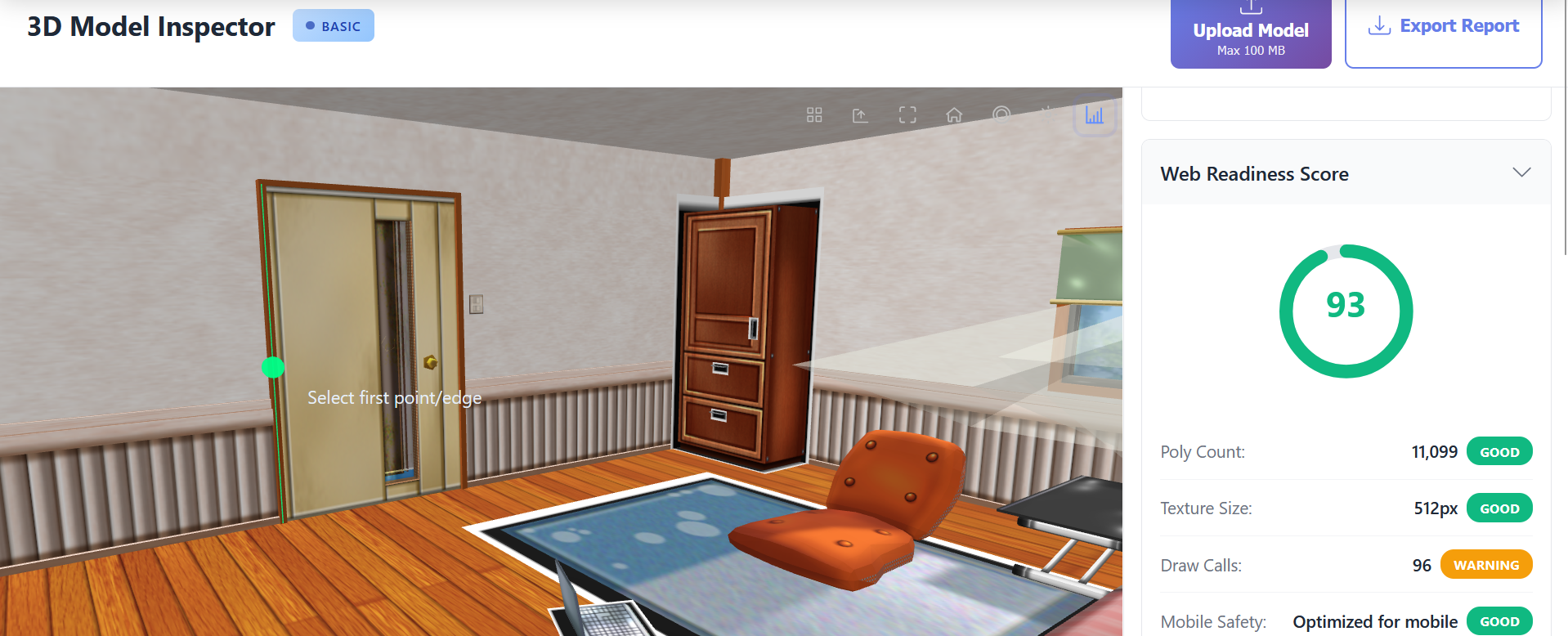
- 📊 See polygon, vertex, and volume totals instantly
- 🧭 Measure clearances without leaving the browser
- ⚠️ Highlight non-manifold edges before export
- 🚀 Gauge web and XR readiness with a simple score
Why Model Inspection Matters
Eliminate mesh issues before they break renders, AR scenes, or 3D prints.
Benchmark poly counts, texture budgets, and draw calls for real-time performance.
Guarantee watertight geometry and correct scale for manufacturing and additive workflows.
Ship assets that meet studio QA checklists and client deliverable standards.
Powerful Features
Comprehensive Geometry Analytics
Instantly compute vertex, edge, and face totals, bounding box dimensions, surface area, and volume. Drill into mesh density hotspots with color-coded overlays to identify where decimation or retopology will have the greatest impact on performance without sacrificing detail.
Advanced Error Detection
Spot flipped normals, non-manifold edges, self-intersections, and open boundaries before they derail slicing or render pipelines. Toggle targeted visual overlays to inspect each error type independently and export a remediation checklist for your DCC tool of choice.
Web & XR Readiness Score
Receive a 0-100 readiness score tuned for WebGL, WebXR, and mobile browsers. The inspector audits polygon budgets, texture resolutions, shader complexity, and animation payloads, then provides precise optimization tips for ecommerce viewers, AR previews, and digital twins.
Precision Measurement Toolkit
Verify scale with metric or imperial units, capture edge lengths, face angles, clearances, and center-to-center distances. Measurements persist between views so engineers, product designers, and QA teams can document tolerances without leaving the browser.
Audit-Ready PDF & JSON Reports
Export branded PDF reports or structured JSON summaries containing full analytics, error lists, readiness scoring, and measurement snapshots. Share findings with clients, attach to Jira tasks, or archive for compliance and revision tracking.
How It Works
Upload or Drag In Your Asset
Drop GLB, GLTF, USDZ, OBJ, STL, FBX, PLY, or 3MF models directly into the browser — nothing ever uploads to a server.
Review Diagnostics & Visual Overlays
Inspect geometry dashboards, toggle problem overlays, capture measurements, and monitor the live readiness score as you iterate.
Export Reports & Implement Fixes
Download PDF/JSON reports, send recommendations to your 3D team, and re-run the inspector after adjustments to validate the improvements.
Perfect For
Advanced 3D Model Diagnostics in Your Browser
3D Model Studio’s inspector equips technical artists, developers, and engineers with a full diagnostic dashboard for any mesh. Launch the web app, drag in a model, and instantly surface geometry counts, surface area, bounding box dimensions, and volume metrics. Because the workflow is entirely browser-based, there is no installation, no dongles to manage, and no risk of sensitive designs leaving your network.
Validate Mesh Integrity Before Production
Avoid costly surprises by spotting non-manifold edges, inverted normals, duplicate vertices, and open surfaces the moment a model is imported. Visual heat maps make it easy to zero in on problem zones, while the issue list provides a prioritized checklist you can hand off to a modeler. STL and PLY files gain additional watertightness checks so you can approve models for additive manufacturing with confidence.
Optimize for Web, AR, and XR Delivery
The inspector’s readiness score is derived from benchmark data gathered across WebGL, WebGPU, and WebXR viewers. It evaluates polygon counts, draw calls, material complexity, and texture payloads, then suggests right-sized budgets for hero models, secondary assets, and mobile-first experiences. This makes it simple to prepare 3D catalogs, digital twins, or configurators that load quickly and run smoothly everywhere.
Precision Measurements Without Leaving the Browser
Engineers and product teams can confirm clearances, thickness, and overall scale using the built-in measurement suite. Capture linear, angular, and radial values directly on the mesh, export the results, and attach them to design reviews or compliance documentation. Measurement annotations remain intact as you orbit, zoom, and switch overlay modes.
Generate Shareable Reports in Seconds
One click exports a richly formatted PDF or machine-readable JSON summary. Reports document every metric, error, and recommendation so stakeholders can review issues asynchronously. Agencies leverage these exports to keep clients updated, while in-house teams archive them for QA sign-off and traceability.
Client-Side Security for Confidential Assets
Because the inspector executes entirely inside your browser sandbox, proprietary CAD assemblies, scanned medical data, and unreleased product designs never leave your workstation. This architecture satisfies strict enterprise governance requirements while still delivering the speed and convenience of a SaaS workflow.
Free Tier with Pro-Grade Capabilities
Start inspecting models immediately with no paywall. The free tier includes unlimited analyses, measurement tools, and readiness scoring. Upgrade when you need team workspaces, branded reporting, or enterprise SSO — the inspection engine remains the same across every plan.
Frequently Asked Questions
Does the inspector change or upload my files?
No. All processing is client-side using WebGL and WebAssembly. Your original files stay on your device and are never transmitted or modified.
Can I analyze animated or rigged assets?
Yes. The inspector reads skeleton hierarchies, animation clips, and skin weights so you can gauge runtime performance before import into Unreal, Unity, or WebXR experiences.
How accurate are the measurements?
Measurements are derived from original vertex data with floating-point precision. Toggle between metric (mm/cm/m) and imperial (in/ft) units to match your production pipeline.
What optimization tips will I receive?
Recommendations highlight polygon reduction targets, texture compression suggestions, draw call consolidation, and material/lighting tweaks aligned with WebGL best practices.
Ready to Inspect Your 3D Model?
Start analyzing your models for free. No sign-up required.