Inspect every 3D model before it ships
Upload a model to spot broken normals, non-manifold edges, thin walls, and heavy textures before clients, web viewers, or printers do. Get an instant readiness score and fix list — all processed locally in your browser.
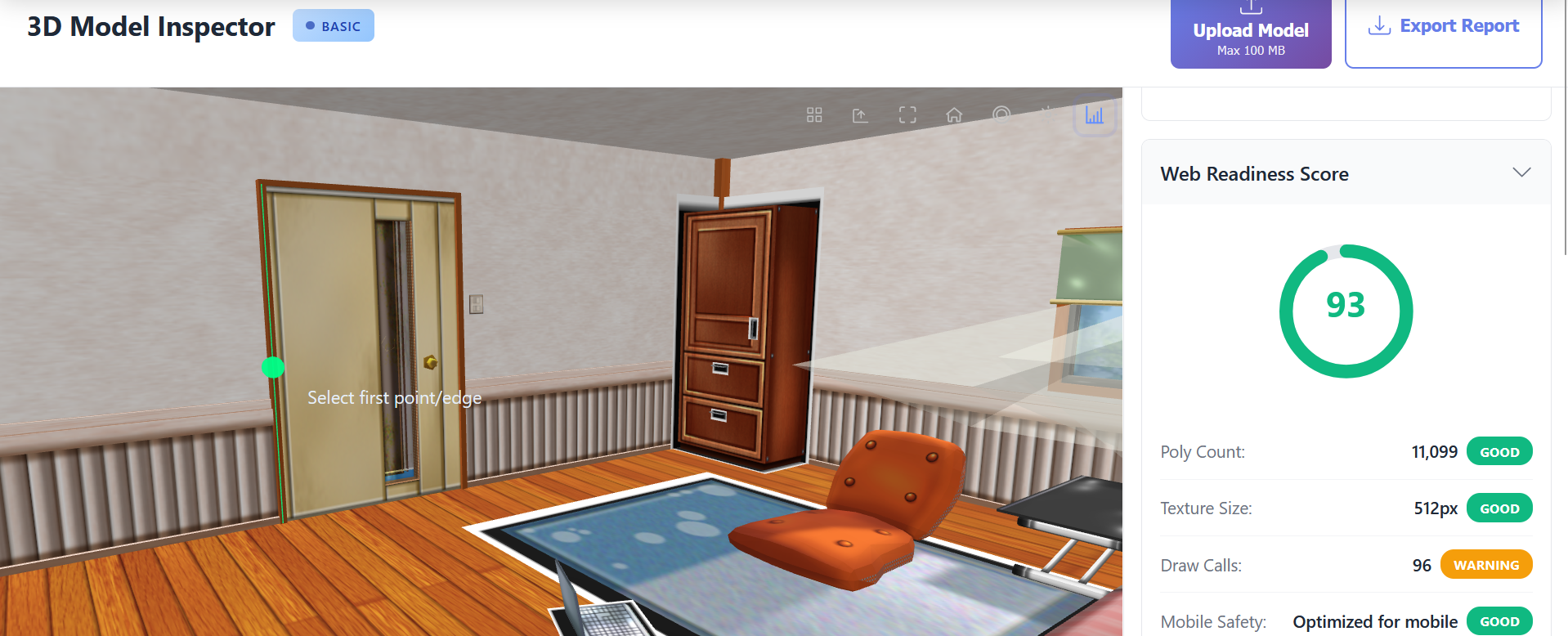
- 🔍 Face, vertex, and volume stats at a glance
- ⚡ Highlight non-manifold edges and flipped normals
- 📊 Web and mobile performance readiness score
- 🔒 Client-side privacy for sensitive CAD files
Why teams rely on the 3D Model Inspector
Catch flipped normals, open edges, and stray geometry before they break renders or slicers.
See whether the asset will hit frame-rate targets on phones, headsets, and laptops.
Confirm STL and CAD exports are watertight and on-scale before you start printing.
Share a simple readiness score and checklist with clients or teammates.
Powerful Features
Complete Geometry Analysis
Get comprehensive statistics on your 3D model including vertex count, face count, edge count, bounding box dimensions, and accurate volume calculations. Our real-time analysis processes models instantly to give you the metrics you need for optimization decisions. Perfect for understanding model complexity before web deployment or identifying issues that could impact performance.
Visual Error Detection
Automatically scan for and highlight common geometry problems including flipped normals, non-manifold edges, open boundaries, and degenerate faces. Visual overlays show exactly where issues exist on your model, making it easy to locate and fix problems in your 3D software. Essential for ensuring models are watertight and ready for 3D printing or game engines.
Web Readiness Score
Receive an instant 0-100 performance score that evaluates your model for web and mobile deployment. Our scoring algorithm analyzes polygon count, texture sizes, draw calls, and mobile compatibility to give you actionable insights. Know exactly how your model will perform before publishing to websites, AR experiences, or e-commerce platforms.
Measurement Tools
Measure point-to-point distances, edge lengths, and angles between faces directly on your 3D model in real-time. Click any two points to get precise measurements in your preferred units. Perfect for verifying dimensions match CAD specifications, checking clearances, or ensuring scale accuracy before production or printing.
Exportable Reports
Generate comprehensive inspection reports in multiple formats including detailed text summaries and professional PDF documents. Reports include all geometry metrics, detected errors with severity levels, web readiness scores, and actionable optimization recommendations. Save reports for documentation, share with team members, or include in project deliverables.
How It Works
Upload Your Model
Drag and drop any 3D model file (GLB, STL, OBJ, FBX, PLY, 3MF, USDZ)
Review Analysis
View geometry stats, error detection, and web readiness metrics in real-time
Export & Fix
Download comprehensive report and apply recommended fixes
Perfect For
Why Choose Our 3D Model Inspector?
Our 3D Model Inspector is a comprehensive browser-based validation tool for analyzing and optimizing 3D assets. It delivers instant geometry analysis, error detection, and web readiness scoring without uploads or installs. Whether you're preparing models for game engines, validating STL files for 3D printing, or optimizing assets for WebGL delivery, the inspector provides the actionable data you need to ship with confidence.
The geometry analysis system goes beyond simple polygon counting. You get detailed breakdowns of vertices, faces, edges, bounding box dimensions, and volume calculations — computed in real-time as you load the model. These metrics help you understand complexity at a glance, spot optimization opportunities, and plan LOD or mesh simplification strategies that meet mobile and headset budgets.
Detect Errors Before They Cause Problems
Geometry errors can derail production. Non-manifold edges break slicers, flipped normals cause shading artifacts in AR/VR, and open boundaries can fail booleans in CAD. The inspector scans your model in seconds and highlights issues with overlays so you can fix problems before they impact the workflow. It checks flipped normals, non-manifold edges, open boundaries, degenerate faces, and duplicate vertices.
Web Readiness Scoring for Optimal Performance
Publishing 3D models to websites, AR experiences, or e-commerce platforms requires careful optimization. Our web readiness scoring evaluates polygon count, texture resolution, draw calls, and mobile compatibility to provide a 0-100 score with specific recommendations. Use it to validate assets before shipping to WebGL viewers, XR experiences, or product configurators.
Professional Measurement Tools
Accurate measurements matter in manufacturing, architecture, and product design. Built-in tools let you measure distances, edges, and angles directly on the model in metric or imperial units. Confirm CAD exports maintain scale, check clearances between parts, and validate 3D scans before production or quoting.
Comprehensive Reports and Documentation
Document results with exportable reports in multiple formats. Generate text summaries or PDF reports that include geometry statistics, detected errors, readiness scores, and measurements. Use reports to track iterations, share fixes with teammates, or satisfy QA and compliance requirements.
Complete Privacy and Security
Your 3D models are valuable IP. The inspector runs client-side using WebGL and WebAssembly, so files never leave your device. This protects confidential CAD data, unreleased game assets, and proprietary product designs while delivering fast, desktop-quality performance.
Frequently Asked Questions
Is my model data secure?
Yes. Everything runs in your browser using WebGL and WebAssembly, so your meshes never upload to our servers and stay on your machine.
What file formats are supported?
You can inspect GLB, GLTF, STL, OBJ, FBX, PLY, 3MF, and USDZ files. Drag in individual assets or zipped bundles with textures.
Can I use this for 3D printing validation?
Yes. The inspector flags non-manifold edges, thin walls, flipped normals, and open shells so you can fix issues before slicing or printing.
Do I need to create an account?
You can run inspections for free without logging in. Create an account when you want to save reports, track history, or unlock team features.
Is there a file size or polygon limit?
The browser comfortably handles models up to a few million triangles. If a model is too heavy, the app prompts you to decimate or split it before re-running checks.
Can I switch measurement units?
Yes. Toggle between metric (mm, cm, m) and imperial (in, ft) units at any time. Measurements update instantly so mixed teams stay aligned.
How do I share inspection results?
Export a PDF or JSON report directly from the inspector. Reports include stats, screenshots, readiness scores, and prioritized fixes you can send to clients or teammates.
Does the tool work with animated or rigged assets?
Animated meshes, skeletons, and skin weights load just fine. You can review clip counts, bone hierarchies, and mesh density before moving into a game engine or DCC.
Ready to Inspect Your 3D Model?
Start analyzing your models for free. No sign-up required.